


|
|
|
இதை வச்சும் தேடலாம்
தமிழ் ரேடியோ


என்னைப் பத்தி ஹி...

- மணிபாரதி
- சென்னை, தமிழ்நாடு, India
- என்னை பத்தி நானே என்னன்னு சொல்றது??? நீங்க தான் சொல்லணும் நம்ம அருமை பெருமையெல்லாம்!!!
How do I use a custom domain name on my blog?
7:30 AM // 0 comments // மணிபாரதி // Category: Blogger Lessons Tricks //Publishing on Blog*Spot is the fastest and easiest way to use all of Blogger's great features. (And for free, no less!) If you don't care to have blogspot.com in your blog's address, though, you can get a domain of your own. We'll continue to host all your content as before, but it will be displayed at your new address. (Unlike FTP publishing, which requires you to buy both a domain name and a hosting service.)
Choose and Register Your Domain
The first thing you'll need to do is to choose a domain name, likeexample.com and register it. You can register domain names from any of a number of different registrars, and you can use .com, .org, .net or any other valid addresses. Remember: you only need to get the domain name; you don't have to pay extra for hosting service. The easiest way to register a domain is to buy your domain directly through Blogger. If you go this route, we'll automatically configure all of your relevant DNS settings and attach your new domain to your existing blog immediately.Update the DNS Settings
DNS stands for Domain Name System, and a DNS server determines what site a given address takes you to. So far, you have a domain name but none of the servers on the internet know what to do with it yet. To take care of this, you need to do two things:- Create a CNAME record for your blog's address, which should be a subdomain of the form
www.example.com.
- To create a CNAME record for your domain with the DNS, associating your domain with:
ghs.google.com.The exact procedure for doing this varies depending on your domain registrar, but you can find instructions for many common registrars here. If yours isn't listed, or if you run into other difficulties, you can contact your registrar directly and they'll be able to help you out.- Create 'A' NAME records for your naked domain (
blog.com)Note: The following information applies to naked domains only!! If you're setting up a subdomain then this does NOT apply to you! :-)
- Creating A records for your naked domain is important as it allows Google to redirect people who use in your naked domain name (
blog.com) to your blog page (www.example.com). If you do not do this, visitors who leave off the www will see an error page.- There are four separate A records you will create, and can be done from the same control panel you accessed your CNAME records. Simply point your naked domain (
example.com, without the 'www') to each of the following IP addresses:Update Your Blogger Settings
Almost done! At this point, you have a domain name, and the DNS servers know to direct people to Google when they want to see your blog. But Google hosts lots of blogs, so we have to make sure the right one is associated with this domain. You'll do this on the Settings | Publishing tab for your blog in Blogger. If you're publishing on Blog*Spot, you'll see a link near the top offering to switch you to a custom domain. Go ahead and click that link.
 The Blog*Spot Address setting now changes to Your Domain. Fill in the domain you registered, and then save your settings.
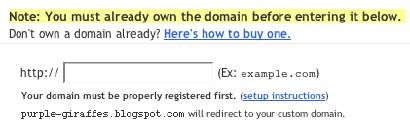 Now the only thing left to do is to tell everybody about your new address!
Notes:
- If your new domain isn't taking you to your blog, wait another day or two to make sure all the DNS servers have been updated. If it still isn't working, contact your registrar to make sure you entered the DNS settings correctly.
- Your original Blog*Spot address will automatically forward to your new domain. That way, any existing links or bookmarks to your site will still work.
- You can use this feature with domains (e.g.
example.com) or subdomains (e.g.). However, you cannot specify subdirectories (e.g. example.com/blog/) or wildcards (e.g.*.example.com). - Your posted images will continue to display on your blog as described here.


- Share this on del.icio.us
- Digg this!
- Stumble upon something good? Share it on StumbleUpon
- Share this on Reddit
- Add this to Google Bookmarks
- Tweet This!
- Share this on Facebook
- Share this on Mixx
- Subscribe
- Buzz up!
- Share this on Linkedin
- Submit this to DesignFloat
- Share this on Technorati
- Submit this to Script & Style
- Post this to MySpace
- Share this on Blinklist
- Share this on FriendFeed
- Seed this on Newsvine
Related posts :
0 comments for this post
Leave a reply

365 Days 24x7 Support : Support provided by Hosting Palace is one of the best in the web hosting industry in India.
Infrastructure : All our Web hosting plans, Reseller hosting plans are hosted in the world class Intel Core 2 Quad servers (8 Processors) with atleast 4GB of RAM and they are co-located at Premium Data Centers. All our Windows web hosting and Linux web hosting are are connected to the internet backbone of 70 Gbps from various top class upstream providers!
Reliability : We Provide an uptime guarantee of 99.9 % and you can be assured that signing up for a Linux Web Hosting Plans, Linux Reseller Hosting Plans is backed by 100% risk free 14 Days money back guarantee. In Coming days We are going to offer Cheap web hosting Server, Windows web hosting server, and Linux web hosting servers at affordable prices. Cheap Web Hosting, Cheap Reseller Hosting, Cheap Windows Hosting and Cheap Linux Hosting from Hosting Palace a Web Hosting Company from Chennai, INDIA.
Low Cost Domain Name Registration : Currently we are doing domain name registrations for Rs.449/- for .com, .net, .org, .biz, .info, .name, Rs.700/- for .in and all second level .in for Rs.350. Domain reseller will get discounted prices of Rs.420/-, Rs.700/- or and Rs.350/- respectively.
Quality Web Hosting India : Windows Hosting Plans, Linux Hosting Plans are best suited for Small Business Hosting, Personal Web Hosting and for Student Community.
Cheap Reseller Hosting India : Windows Reseller Hosting, Linux Reseller Hosting are best suited for (1) web hosting reseller (2) Web designers who are interested in offering web hosting services and want to build their own Linux or Windows web hosting company can choose from our Linux reseller hosting plans or Windows reseller hosting plans. Ready, Set, Go!..
Cpanel Web Hosting India : All our Linux Web Hosting and Linux Reseller Hosting comes with Cpanel Hosting Control panel the world's No.1 for Linux Web Hosting.
Affordable Web Designing India : We are having thousands of satisfied customers and hundreds of happy resellers. Several customers requested us to provide web designing services and hence we have started web designing services too. We highly recommend you to go through our Web Design Portfolio to see our compled web design projects.
Contact 24x7 Support : Manibharathi Mob : 09380083338


Followers
தமிழ் நடிகைகள் படங்கள்


Feedjit
பிடித்ததில் படித்து !!!
ஒருவர் உன்னை தாழ்த்திப் பேசும்போது ஊமையாய் இரு...
புகழ்ந்து பேசும்போது செவிடனாய் இரு... எளிதில் வெற்றி பெறுவாய்!
-அப்துல் கலாம்
 2009 - 2010 WebIndiaToday.